
Ask an LLM a research question and you get a single-pass answer — whatever the model can produce from one prompt. That works for simple questions, but falls apart for anything that requires gathering information from multiple sources, comparing data points, and synthesizing findings into a structured document. A research analyst doesn’t write a report in one shot; they break the question into parts, go find the relevant data, and then assemble the pieces.
I built Agents for Analysis Report Creation to automate that workflow. The system takes a research topic, decomposes it into subtasks, executes each subtask using a combination of document retrieval and web search, and synthesizes everything into a structured Markdown report. The knowledge base is built from real Statistics Canada publications on housing, rent, construction investment, and demographics.
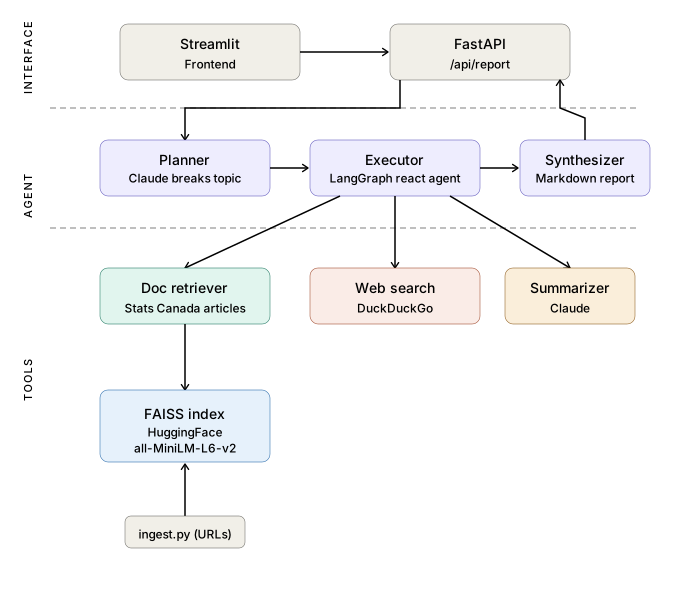
The Plan-and-Execute pattern
The core idea comes from the Plan-and-Solve paper: instead of asking an LLM to do everything at once, you first ask it to plan (break the question into steps), then execute (carry out each step with access to tools), then synthesize (assemble the results). Each phase has a clear input and output, which makes the system debuggable and testable in ways that a single monolithic prompt isn’t.
The pipeline has three phases:
Phase 1 — Plan. Claude receives the user’s research topic and decomposes it into 3–6 concrete subtasks. For example, given “Analyze Canada’s housing affordability crisis using recent statistical data,” the planner might produce:
- Search for recent rent price trends across Canadian cities
- Find data on building construction investment by province
- Look up how non-permanent residents are affecting housing demand
- Search for information on unmet housing need and housing instability
- Synthesize findings into an affordability analysis
The planner is instructed to produce subtasks that are specific enough to be answerable by a single tool call, and broad enough that 3–6 of them cover the research topic. This is a tension — too few steps and you miss important dimensions; too many and you burn tokens on redundant retrieval.
Phase 2 — Execute. A LangGraph react agent runs each subtask. For every step, it decides which tool to use, calls it, evaluates the result, and optionally calls additional tools if the first result was insufficient. The agent has three tools available:
- Document retriever — semantic search over the FAISS vector store (ingested Statistics Canada articles)
- Web search — live DuckDuckGo search for supplementary context
- Summarizer — Claude-powered condensation for when retrieved passages are too long
Phase 3 — Synthesize. Claude takes all the step results and compiles them into a structured Markdown report with an Executive Summary, Key Findings, Analysis, and Conclusion.
Why LangGraph over a simple loop
The original tutorial I was working from used LangChain’s PlanAndExecute agent with OpenAI and Deep Lake. Both of those are outdated — AgentExecutor was removed from the LangChain base package in version 1.2, and Deep Lake requires an external account. I rebuilt the pipeline using LangGraph’s create_react_agent and FAISS for the vector store.
LangGraph’s react agent handles the tool-selection loop natively. On each step, the agent reasons about what it needs, picks a tool, observes the result, and decides whether to continue or return. This is more robust than a hardcoded “call retriever first, then web search if retriever fails” logic, because the agent can adapt — sometimes the document store has the answer and web search is unnecessary; sometimes the retrieved passage is too long and needs summarization first.
The graph structure also makes it straightforward to add observability. Each node in the graph (the planner, the executor, the synthesizer) can be traced independently, which matters when you’re debugging why a particular report missed a key finding.
Building the knowledge base
The FAISS vector store is populated by ingest.py, which scrapes Statistics Canada publication pages, chunks the text, generates embeddings with HuggingFace’s all-MiniLM-L6-v2 model, and indexes them. The default dataset includes six publications:
| Article | Topic |
|---|---|
| Investment in building construction (Feb 2026) | Construction spending trends by province |
| Non-permanent residents in the homeownership market | Immigration and housing demand |
| Quarterly rent statistics (Q2–Q3 2025) | Rent price trends across Canadian cities |
| Adulting together: Parents and adult children who co-reside | Co-residency demographics |
| Measuring unmet housing need and housing instability | Housing need in households with roommates/extended family |
| Youth screen time and well-being (longitudinal study) | Screen time, mental health, physical activity |
The housing cluster is intentionally cohesive — queries that cross multiple articles (“How do rent trends relate to construction investment?”) force the agent to plan across sources, which is the behavior I wanted to demonstrate.
I chose local embeddings over an API-based service for two reasons. First, it eliminates a dependency — you don’t need an OpenAI or Voyage AI key just to build the index. Second, all-MiniLM-L6-v2 is fast enough that re-ingesting the full dataset takes under a minute, which matters during development when you’re iterating on chunking strategies.
The tool layer
Each tool is a standalone function with a LangChain @tool decorator. Keeping them independent made unit testing straightforward — I could test the retriever against a known FAISS index, test the summarizer with a fixed input string, and mock the web search entirely.
@tool
def retrieve_docs(query: str) -> str:
    """Search the Statistics Canada document store for relevant passages."""
    docs = vectorstore.similarity_search(query, k=3)
    return "\n\n".join(doc.page_content for doc in docs)
The retriever returns the top 3 passages by cosine similarity. I experimented with k=5 but found that the additional passages were usually redundant for the Statistics Canada dataset — the articles are focused enough that 3 chunks cover the relevant information. For a larger, more diverse corpus, you’d want to increase this and possibly add a re-ranking step.
The web search tool uses DuckDuckGo, which requires no API key:
@tool
def web_search(query: str) -> str:
    """Search the web for supplementary information."""
    results = DDGS().text(query, max_results=3)
    return "\n\n".join(
        f"{r['title']}: {r['body']}" for r in results
    )
The summarizer is simple — it sends a passage to Claude with a condensation prompt:
@tool
def summarize_text(text: str) -> str:
    """Condense a long passage into key points."""
    response = llm.invoke(
        f"Summarize the following in 3-4 key bullet points:\n\n{text}"
    )
    return response.content
The FastAPI + Streamlit stack
The backend is a FastAPI server with both synchronous and asynchronous endpoints. The sync endpoint (POST /api/report) blocks until the full report is generated — fine for development. The async endpoint (POST /api/report/async) returns a task ID immediately and lets the client poll for status, which is what the Streamlit frontend uses to show live progress.
The Streamlit frontend displays the agent’s plan as it’s generated, shows progress as each step executes, and renders the final report as formatted Markdown with a download button. Streamlit’s st.session_state keeps the plan and step results persistent across reruns, so the UI doesn’t reset when you interact with it.
I considered building a React frontend instead, but Streamlit was the right call for this project. The UI is functional, not beautiful — and the point of the project is the agent pipeline, not the interface. Streamlit let me build the whole frontend in about 80 lines of Python.
What I learned
The planner’s output quality determines everything downstream. If the planner produces vague subtasks (“research the topic”), the executor retrieves generic passages and the final report is shallow. If it produces specific subtasks (“find quarterly rent price data for major Canadian cities in 2025”), the retriever pulls exactly the right chunks. I spent more time iterating on the planner prompt than on any other part of the system.
Tool selection is the interesting decision. The react agent’s choice of tool per subtask is where the system shows intelligence — or doesn’t. Early versions would call web search for everything, even when the answer was sitting in the FAISS index. Adding explicit descriptions to each tool (“Search the Statistics Canada document store for relevant passages” vs “Search the web for supplementary information”) fixed this. The agent needs to understand what each tool is for, not just that it exists.
The three-phase split makes testing tractable. I wrote 26 tests covering tools, the agent pipeline, and the API endpoints. Because each phase has a defined input and output — the planner takes a topic and returns a list of subtasks, the executor takes a subtask and returns findings, the synthesizer takes all findings and returns Markdown — each phase can be tested with mocked dependencies. Testing a monolithic “research agent” that does everything in one pass would be much harder.
Local embeddings are underrated for portfolio projects. Using all-MiniLM-L6-v2 instead of an API-based embedding model means anyone can clone the repo and run it with just an Anthropic API key. No secondary account, no additional costs, no rate limits on embedding generation. For a project meant to be reproducible, this matters.
What’s next
A few extensions I’m considering:
- Streaming step results to the frontend as they complete, rather than polling
- Adding a re-planning step — if the executor discovers that a subtask can’t be answered, have it request a revised plan from the planner
- Expanding the knowledge base to cover more Statistics Canada domains (labor market, CPI, immigration statistics)
- Adding citations — the final report should link specific claims back to the source documents and passages that support them
The code is on GitHub.
Part of my AI/ML project portfolio. Built with Claude, LangGraph, LangChain, FAISS, FastAPI, and Streamlit.
- langgraph (2) ,
- langchain (3) ,
- claude (5) ,
- faiss (3) ,
- fastapi (2) ,
- streamlit (2) ,
- python (4) ,
- agents (1)
